
Works everywhere
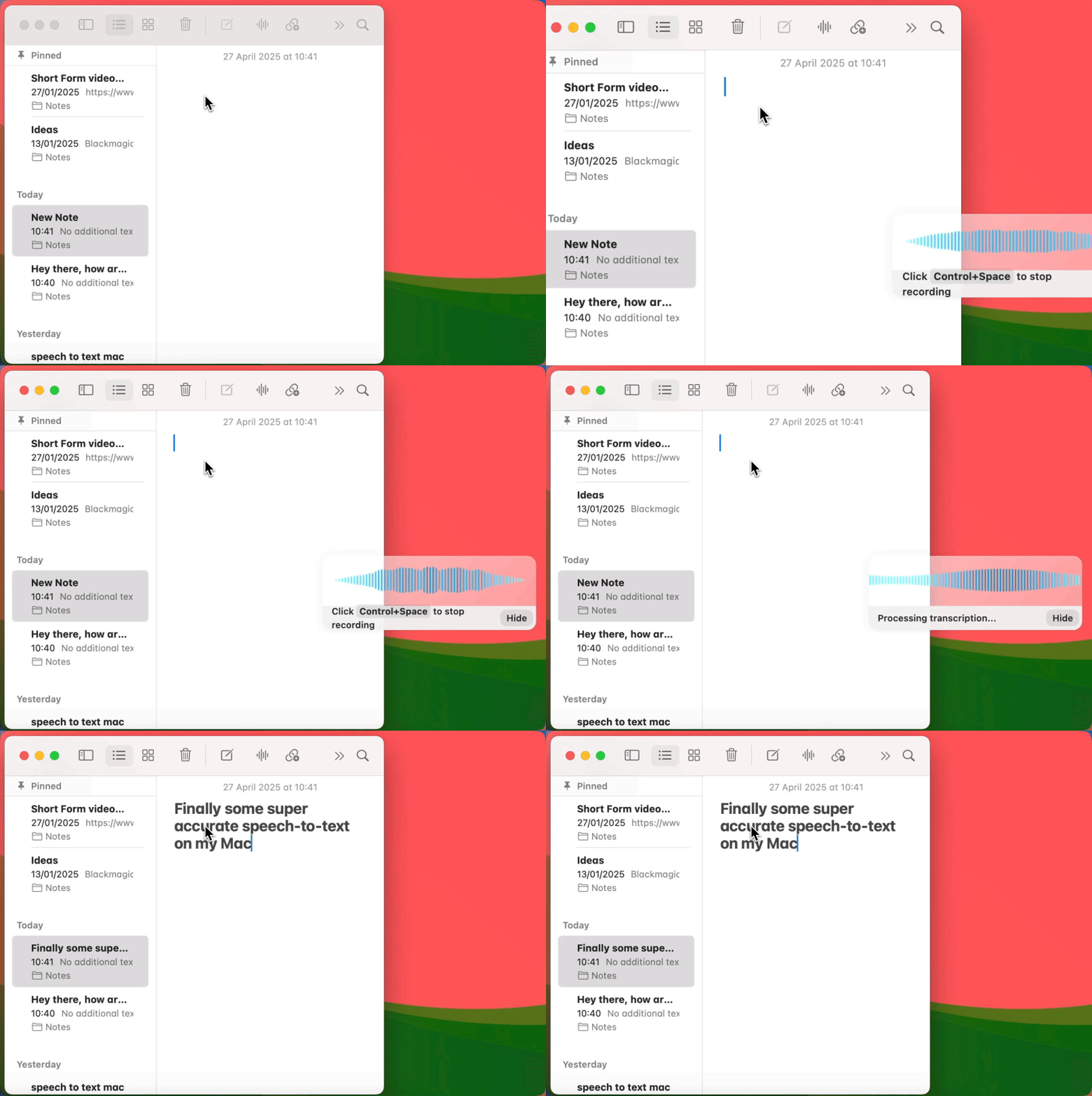
Voicy works on all the websites and apps you use daily. This means you can use voice typing to write emails, messages, documents, blog posts, etc.This means your voice can write emails, messages, documents, blog posts, etc.

















 Voicy
Voicy
Speech to Text Desktop App for Safari
Write with your voice throughout Safari.
Over 99% accuracy in 50 languages.
No Safari extension needed.
Try for free. No credit card required.
And +20,000 more

I've tried other products like it, and, so far, Voicy is the most user-friendly, and it really improves my workflow.

This is the tool that I was looking for. It is amazing. I've gotten so lazy about typing anywhere. Thank you, thank you, thank you for this product!

Voicy is an absolute game-changer! This voice-to-text extension delivers exceptional accuracy, capturing my words perfectly every time. The speed is impressive.

Almost instant replies from the creator, great support great app!

I love Voicy!! The extension and the desktop app have saved me so much time. I have tried several different voice-to-text apps. None of them compares to Voicy!
Voicy works on all the websites and apps you use daily. This means you can use voice typing to write emails, messages, documents, blog posts, etc.This means your voice can write emails, messages, documents, blog posts, etc.
Nobody sees your transcripts except yourself.
You can read more about our privacy policy here.
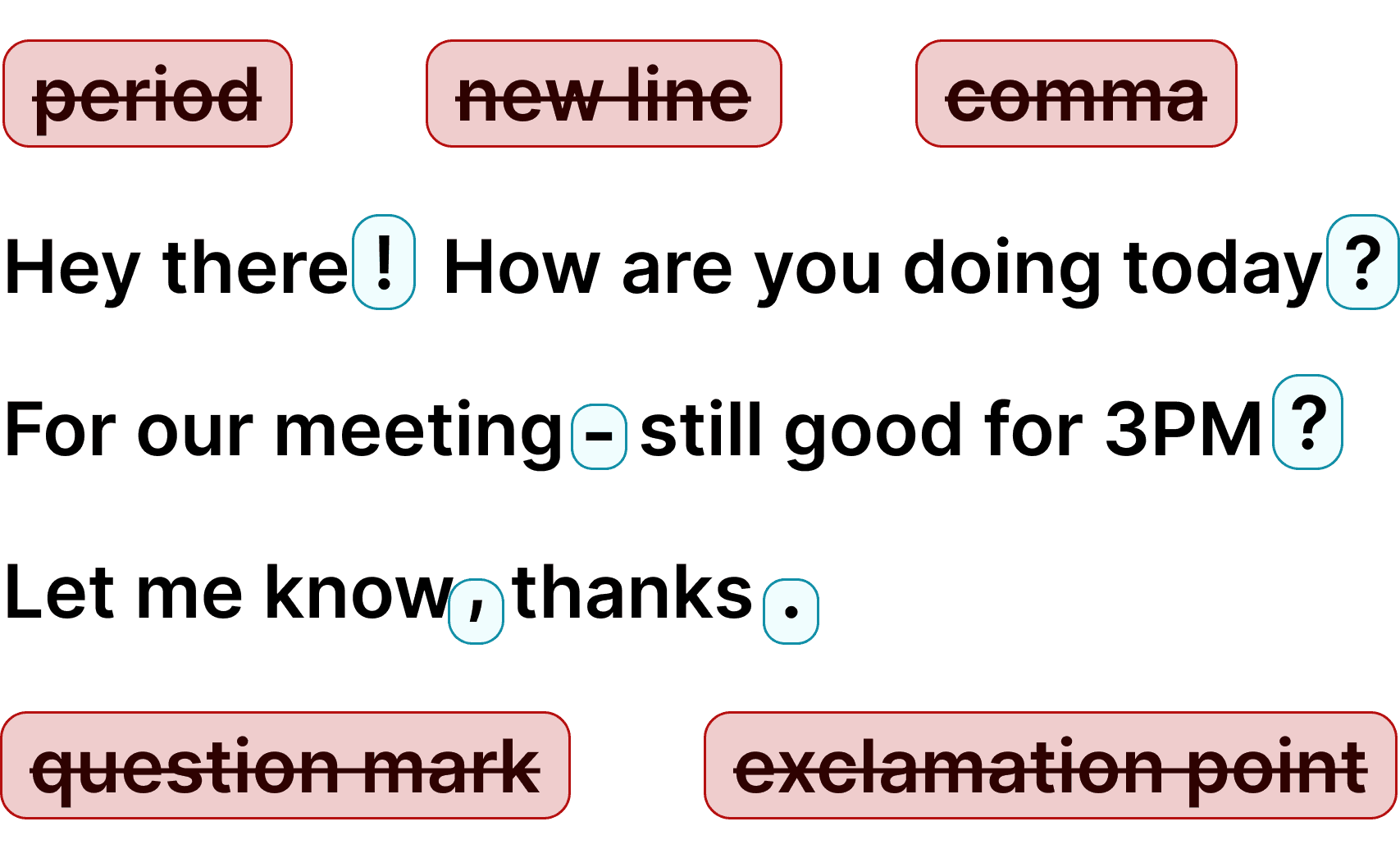
Voicy automatically adds perfect punctuation to your dictated text.
Zero typos, perfect grammar, perfect punctuation.
Voicy gives you over 99% accuracy in more than 50 languages, including speech-to-text in English, German, French, Spanish, Portuguese, Mandarin, etc.Over 99% accuracy in more than 50 languages, including speech to text in English, German, French, Spanish, Portuguese, Mandarin, etc.
Step 1
Install Voicy to add voice dictation to Safari and other text fields on your computer.
Step 2
Click a text field in Gmail, Google Docs, Notion, ChatGPT, a search bar, or a web form.

Step 3
Use your keyboard shortcut, speak naturally, and press it again to stop. Review the dictated text before sending.
Dictate emails, forms, and documents while browsing instead of typing every word.
Audio is processed to create text and Voicy does not store recordings or transcriptions after processing.
The desktop app adds dictation to Safari text fields and other Mac apps without a browser extension.
Safari is the default browser on every Mac, but it lacks voice typing extensions. Voicy solves this by working at the desktop level. It adds speech to text to Safari without needing a browser extension. Dictate into Gmail, Google Docs, Notion, ChatGPT, or any website open in Safari.
Voicy also works with Chrome, Firefox, Arc, and desktop apps. You can dictate in Safari without adding a browser extension.
Voice dictation in Safari lets you write emails, compose documents, fill out forms, and prompt AI tools with less typing. macOS Dictation provides a built-in option; Voicy adds AI editing and a shared workflow across apps.
Voicy gives you one desktop dictation tool that works across Safari, every browser, and every app. 99% accuracy, automatic punctuation, AI editing, and over 50 languages. No Safari extension needed.
GmailDictate emails in Gmail, Outlook, and any webmail client open in Safari. Write replies in seconds instead of minutes.
Read More Google Docs
Use voice dictation to write in Google Docs, Notion, and other web apps in Safari. Draft reports, meeting notes, and blog posts hands-free.
Read MoreSafariDictate search queries, fill out web forms, and write comments on any website in Safari. Voicy works in every text field.
Read MoreOutlookJob applications, surveys, support tickets, and contact forms — dictate into any text field in Safari instead of typing.
Read MoreNotionCapture thoughts, meeting notes, and research findings while browsing in Safari. Speak your ideas before you lose them.
Read MoreChatGPTSend prompts to ChatGPT, Claude, and Perplexity in Safari using your voice. Think out loud instead of typing long prompts.
Read MoreOur price will never be more than 20% above our total costs.
See if you like Voicy
Start for free. No credit card required.
For the everyday user
$8.49/month
Pay once, use forever
$260
Speed up your entire org
$6.79/user/mo
Safari can use macOS Dictation for voice input. Voicy adds a separate desktop dictation workflow with automatic punctuation and AI editing.
No. Voicy is a desktop app, not a browser extension. Safari has very few voice typing extensions due to Apple restrictions. Voicy skips the extension entirely and works at the OS level, so it adds dictation to every text field in Safari.
Yes. Voicy works in every text field in Safari — Gmail, Google Docs, Notion, ChatGPT, Reddit, web forms, and any other site. If you can type in it, you can dictate in it.
Voicy supports over 50 languages including English, Spanish, French, German, Portuguese, Mandarin, Japanese, and many more. All languages work in Safari and every other app.
Yes. Voicy is available on both Mac and Windows. On Mac, it works perfectly with Safari. On Windows, it works with all browsers and apps.
Yes. You can start with a free trial to test Voicy in Safari and all your other apps before subscribing.
Voicy processes audio to create text and does not store recordings or transcriptions after processing. See the privacy policy for details.
Voicy delivers over 99% accuracy powered by the latest AI speech recognition. It handles accents, technical terms, and natural speech with automatic punctuation.